ShopDreamUp AI ArtDreamUp
Deviation Actions


Suggested Deviants


Suggested Collections


![Luto Suite 1.1 [Rainmeter Skin]](https://images-wixmp-ed30a86b8c4ca887773594c2.wixmp.com/i/ee7c62bd-521a-4295-b96e-2a25f177ea51/d5xm5hl-b445d816-7f0f-4337-ab5b-dea4cc4892cb.png/v1/crop/w_184,h_184,x_36,y_0,scl_0.29725363489499,q_70,strp/luto_suite_1_1__rainmeter_skin__by_jlynnxx_d5xm5hl-92s-2x.jpg)
![Luto Suite 1.1 [Rainmeter Skin]](https://images-wixmp-ed30a86b8c4ca887773594c2.wixmp.com/i/ee7c62bd-521a-4295-b96e-2a25f177ea51/d5xm5hl-b445d816-7f0f-4337-ab5b-dea4cc4892cb.png/v1/crop/w_92,h_92,x_18,y_0,scl_0.1486268174475,q_70,strp/luto_suite_1_1__rainmeter_skin__by_jlynnxx_d5xm5hl-92s.jpg)


You Might Like…


Featured in Groups





Description
15AUG2012: Android ICS/JB Photoshop GUI Design Kit updated to 3.0!
26FEB2012: Android ICS GUI Design Kits updated to 2.0.1!
19JAN2012: Android ICS GUI Design Kit updated to 2.0!
Similar to 1.0, the main motivation of doing this is just to provide some stock elements of Android 4.0+ (Ice Cream Sandwich/Jelly Bean) in a single .psd file so app designer can really focus on creating awesome mock up to show their developers/clients. Some of the elements are just single layer of image, but they should be pretty adequate for quick mock up purpose.
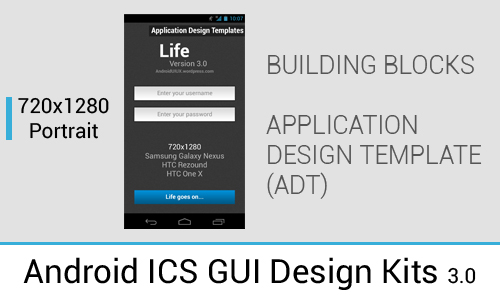
In 3.0, I have included two .psd file in the Design Kit – Building Blocks and ADT.
In Building Blocks, it contains most, if not all of the stock ICS/JB UI elements that can be used to build an app mockup in Photoshop. Most of them covered both Holo Light and Holo Dark themes, so you can easily drag and drop the properly grouped UI elements to your app design.
As for the ADT (not to be confused with the Android Development Tools which is a plugin for the Eclipse IDE), it serves as a starting point for the app designers/developers of the app design. You have the choice to select the design template that start with different amount of tabs and holo theme, and the design in Photoshop starts from there.
So what’s inside the new Android ICS/JB Photoshop GUI Design Kit 3.0:
------------------
Building Blocks
------------------
Soft button
App Login Screen Example
Homescreen (Updated with Jelly Bean Homescreen)
Launcher Screen
Option Bar (Top and Bottom)
Menu
Keyboard
Notification Center (ICS and Jelly Bean Notification Center)
Notification Bar
Dialogs (Toast, Popups, Alert, Jelly Bean App Uninstallation Dialog)
Quick Control (Lab feature in stock Browser)
Settings Page
Tab Bars (Multiple types)
Switches (Radio Buttons, Checkboxes, On/Off Switches)
Activity (Bar, Circle, Progress Bar)
Sliders
Text Fields
Buttons
Spinner
Grid Lists (Horizontal and Vertical Scrolling Grids)
Lists (Single Line, 2-line and 3-line list)
-----------------------------------
Application Design Templates
-----------------------------------
Scrollable Tabs (Holo Dark/Light, with 2-Line list and To-do list examples)
2 Tabs (Holo Dark/Light, with 2-Line list example)
3 Tabs (Holo Dark/Light, with 2-Line list example)
4 Tabs (Holo Dark/Light, with 2-Line list example)
Collapse Tabs (Holo Dark/Light, with 2-Line list example)
This Android ICS GUI Design Kit is best used with Android Design Preview.
Android UI/UX
26FEB2012: Android ICS GUI Design Kits updated to 2.0.1!
19JAN2012: Android ICS GUI Design Kit updated to 2.0!
Similar to 1.0, the main motivation of doing this is just to provide some stock elements of Android 4.0+ (Ice Cream Sandwich/Jelly Bean) in a single .psd file so app designer can really focus on creating awesome mock up to show their developers/clients. Some of the elements are just single layer of image, but they should be pretty adequate for quick mock up purpose.
In 3.0, I have included two .psd file in the Design Kit – Building Blocks and ADT.
In Building Blocks, it contains most, if not all of the stock ICS/JB UI elements that can be used to build an app mockup in Photoshop. Most of them covered both Holo Light and Holo Dark themes, so you can easily drag and drop the properly grouped UI elements to your app design.
As for the ADT (not to be confused with the Android Development Tools which is a plugin for the Eclipse IDE), it serves as a starting point for the app designers/developers of the app design. You have the choice to select the design template that start with different amount of tabs and holo theme, and the design in Photoshop starts from there.
So what’s inside the new Android ICS/JB Photoshop GUI Design Kit 3.0:
------------------
Building Blocks
------------------
Soft button
App Login Screen Example
Homescreen (Updated with Jelly Bean Homescreen)
Launcher Screen
Option Bar (Top and Bottom)
Menu
Keyboard
Notification Center (ICS and Jelly Bean Notification Center)
Notification Bar
Dialogs (Toast, Popups, Alert, Jelly Bean App Uninstallation Dialog)
Quick Control (Lab feature in stock Browser)
Settings Page
Tab Bars (Multiple types)
Switches (Radio Buttons, Checkboxes, On/Off Switches)
Activity (Bar, Circle, Progress Bar)
Sliders
Text Fields
Buttons
Spinner
Grid Lists (Horizontal and Vertical Scrolling Grids)
Lists (Single Line, 2-line and 3-line list)
-----------------------------------
Application Design Templates
-----------------------------------
Scrollable Tabs (Holo Dark/Light, with 2-Line list and To-do list examples)
2 Tabs (Holo Dark/Light, with 2-Line list example)
3 Tabs (Holo Dark/Light, with 2-Line list example)
4 Tabs (Holo Dark/Light, with 2-Line list example)
Collapse Tabs (Holo Dark/Light, with 2-Line list example)
This Android ICS GUI Design Kit is best used with Android Design Preview.
Android UI/UX
Comments30
Join the community to add your comment. Already a deviant? Log In

Thanks Taylor for this GUI Design Kit!
What about a Nexus 4 Kit (in 768px instaed of 720)?
What about a Nexus 4 Kit (in 768px instaed of 720)?